This post contains affiliate links. We may earn a commission if you make a purchase, at no extra cost to you.
I was two hours into a remote Nevada trail when my F150 started making a grinding noise I’d never heard before. No cell service for 50 miles in any direction. My Garmin inReach could send text messages, but what I really needed was to FaceTime with my mechanic back home so he could hear the noise and see what was happening under the hood.
That’s when I realized my satellite communicator, as essential as it is, has limitations. Text messages are great for “I’m okay” check-ins and emergencies. But sometimes you need actual internet. Real bandwidth. The ability to video call, download detailed maps, check weather radar, or access forums for trail beta.
Six months ago, I picked up a Starlink Mini primarily as a backup home internet device. Then I discovered the standby mode trick that changed everything. For $5 per month, you can keep your account in standby with 2Mbps speeds available anytime you need it. That’s enough for texting, FaceTime, email, and basic web browsing. Perfect for overlanding emergencies.
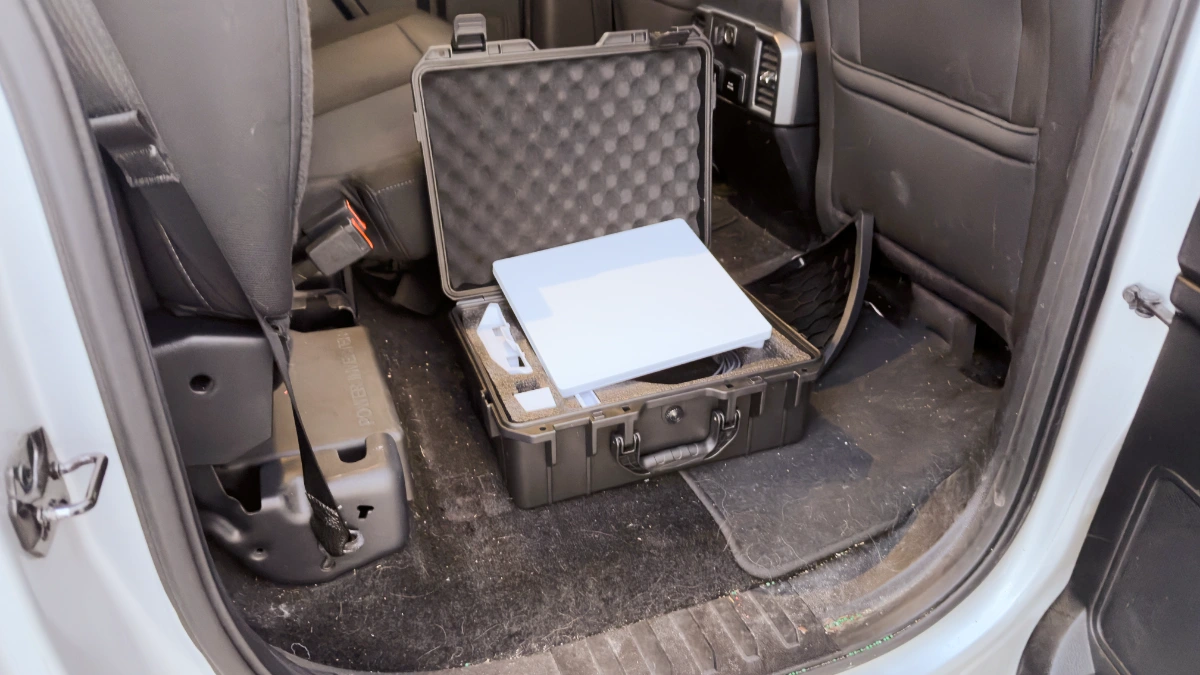
Now I keep the Starlink Mini, a battery pack, and all the accessories in a waterproof case under my truck’s backseat. It’s insurance I hope I never need, but knowing it’s there gives me confidence to explore more remote areas.
In this review, I’m breaking down exactly how I use Starlink Mini for overlanding, the standby mode strategy that makes it affordable, the complete setup I run, and whether it’s worth the investment for backcountry travel.
Quick Answer: Is Starlink Mini Worth It for Overlanding?
Yes, if you regularly travel to remote areas and need more capability than a satellite messenger provides.
The setup:
- Starlink Mini: $599 (hardware)
- Service: $5/month in standby mode (2Mbps unlimited) or $50/month active (full speed)
- Keep it in your truck for emergencies only
- Activates in 5-10 minutes when you need it
What it’s good for:
- Video calls when you need to show someone a problem
- Downloading detailed maps or weather data
- Accessing forums or trail reports
- Communication beyond simple text messages
- Multi-week remote trips where you need occasional internet
What it’s NOT good for:
- Daily use (too much setup time)
- Streaming video (works on standby but slow)
- Using while driving (needs stationary setup with sky view)
- Replacing your cell phone or satellite communicator
Who should buy it: Solo overlanders, people doing extended remote trips, anyone who ventures 50+ miles from cell service regularly
Who shouldn’t: Weekend warriors near civilization, people who never leave cell range, anyone on a tight budget
Why Overlanders Need More Than a Satellite Messenger
Don’t get me wrong. I love my Garmin inReach and I carry it on every trip. It’s essential for emergency SOS and basic text communication. But satellite messengers have real limitations.
What inReach does great:
- Emergency SOS with professional rescue coordination
- Text messaging to family/friends
- GPS tracking so people know where you are
- Works anywhere with clear sky view
- Long battery life
- Simple, rugged, reliable
Where inReach falls short:
- No voice calls (typing on tiny screen is slow)
- No video capability
- Can’t access websites or download data
- Limited to short text messages
- Expensive per message on some plans
Real scenarios where I’ve wished I had more:
Mechanical issue that’s hard to describe in text. Being able to FaceTime with my mechanic and show him the problem beats trying to explain “it makes a weird grinding noise but only when turning left.”
Weather changing fast and I need detailed radar, not just text forecasts. The inReach can request basic weather, but sometimes you need to see the actual radar loop to make smart decisions about whether to push forward or camp early.
Found an amazing campsite and want to send family a quick video showing where I am. With inReach, I’m limited to text and coordinates.
Need to download trail beta or updated maps because conditions changed. Can’t do that with a satellite messenger.
This is where Starlink Mini fills the gap. It’s not a replacement for inReach. It’s a backup for situations where you need actual internet capability.
For more on satellite communicators and when to use them, check out our essential overlanding gear guide.
What is Starlink Mini (and How It’s Different)
Starlink Mini is Starlink’s portable version designed for traveling. It’s smaller, lighter, and lower power than the standard residential dish.
Key specs:
- Size: About the size of a laptop (11.75″ x 10.2″ x 1.45″)
- Weight: 2.43 lbs (1.1 kg)
- Power: 20-40 watts (can run on portable batteries)
- Setup: Built-in wifi router, no additional equipment needed
- Speed: Up to 100+ Mbps active, 2Mbps on standby mode
- Coverage: Works across North America (need roaming enabled)
The big difference from regular Starlink is portability and power requirements. Standard Starlink needs AC power and isn’t designed to move around. Starlink Mini runs on DC power, fits in a backpack, and is built for mobile use.
Compared to Starlink Standard:
- 40% smaller footprint
- 60% less power consumption
- Built-in router (no separate equipment)
- Designed for portability
- Costs less ($299-499 vs $999+ for other models)
For overlanding, these differences matter. You can run it off a portable battery, set it up quickly, and pack it away when done. It’s not perfect, but it’s the first Starlink that actually makes sense for vehicle-based travel.
The Standby Mode Game-Changer
Here’s what made Starlink Mini practical for me as an overlanding backup: standby mode at $5 per month.
When I first bought the Mini, I planned to activate service only when I needed it. But Starlink requires you to maintain an active subscription or your equipment won’t work at all. That meant paying $50/month even if I only used it once or twice.
Then I discovered standby mode.
How standby mode works:
- Keep your account active at $5/month
- Get 2Mbps unlimited data (yes, unlimited at that speed)
- Can upgrade to full speed ($50/month) anytime you need it
- Switch back to standby when done
- No activation fees or delays
What you can do with 2Mbps:
- Text messaging (works great)
- FaceTime audio and video (surprisingly good)
- Email and basic web browsing
- Download maps and small files (slower but works)
- Check weather radar
- Access forums and trail reports
What’s slow at 2Mbps:
- Streaming video (buffers a lot)
- Large file downloads (possible but time-consuming)
- Video conferences with multiple people
- Gaming
For overlanding emergencies, 2Mbps is plenty. I’m not trying to stream Netflix in the backcountry. I need to communicate, get information, and solve problems. Standby mode handles all of that.
Cost comparison:
- Satellite messenger: $15-65/month depending on plan
- Starlink standby: $5/month
- Starlink active: $50/month (when you need full speed)
- Cell phone: Doesn’t work where this matters
My strategy: Keep Starlink on standby year-round ($60/year). Upgrade to active for major trips where I know I’ll want better connectivity ($50 for that month). Total annual cost: $110-170 depending on usage.
That’s cheaper than some satellite messenger plans and gives me way more capability when I need it.
My Complete Starlink Mini Overlanding Setup
Here’s exactly what I carry and how it’s configured.
The Core Equipment
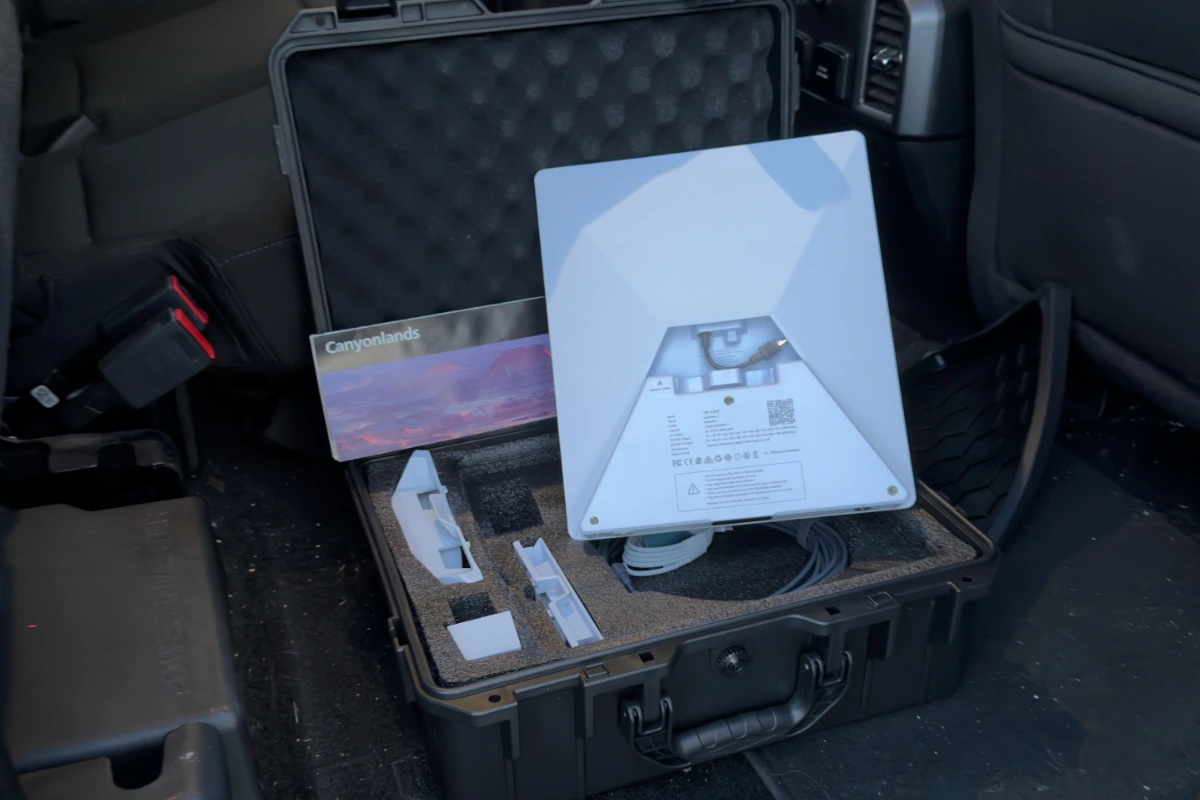
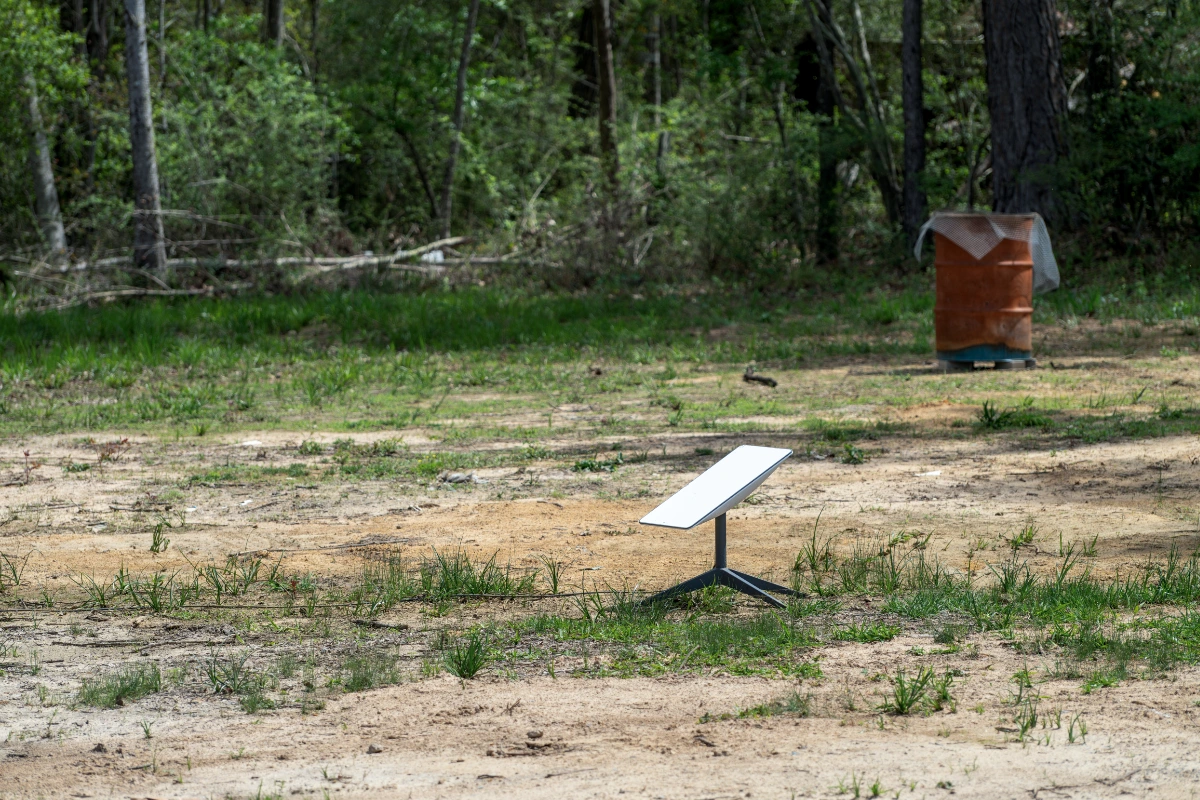
Starlink Mini ($499, $299, Currently $229 direct from Starlink as of 12/3/25) The satellite dish itself. Comes with built-in router, power cable, and kickstand. I added accessories to make it more practical for truck camping.
Buy Starlink Mini direct from Starlink.com or Starlink Mini on Amazon.
Pelican-style Hard Waterproof Case ($75-100) I keep everything in a weatherproof hard case. Protects the dish from getting crushed under gear, keeps moisture out, and makes it easy to grab the whole system when I need it. The case fits the dish, cables, battery, and accessories with room for the router.
I went with the Accecraft Starlink MIni Case (IP67 Waterproof with custom fit foam). It was around $40
Portable Battery Pack / Power Station ($150-300) Starlink Mini draws 20-40 watts, so you need decent power. I use a mid-size power station with 200-300Wh capacity. This runs the Mini for 5-8 hours depending on conditions. You can also run it directly off your truck’s 12V system, but I prefer a dedicated battery so I’m not draining my truck battery.
For serious use, I can recharge the power station off my truck’s dual battery system or solar panels. But for emergency use, a single charge is plenty.
I went with the PeakDo LinkPower Power Bank (27500mAh 99Wh charger with USB-C)
Silicon Protective Cover ($20-30) Added a silicon cover to protect the dish from scratches and minor impacts. The dish is durable but the silicon adds another layer of protection when it’s bouncing around in the truck.
Optional But Useful: GL.iNet Slate 7 Travel Router
The Starlink Mini has a built-in router, and for most situations that’s fine. But I added a GL.iNet Slate 7 travel router ($80) to my kit for a few reasons:
Why I added it:
- Better VPN support if I’m accessing sensitive stuff
- More advanced firewall controls
- Can connect to campground wifi or my phone’s hotspot as backup
- Extra ethernet ports for connecting devices
- Works as a repeater to extend range
When I use it:
- Extended trips where I want better network security
- Situations where I’m connecting multiple devices
- As backup router if Starlink’s built-in router acts weird
When I don’t bother:
- Quick emergency use (Starlink’s router works fine)
- Simple tasks like FaceTime or checking weather
- When I’m trying to keep setup minimal
It’s not necessary, but if you’re into network gear and want more control, the GL.iNet routers are solid. For pure overlanding backup use, skip it and just use the built-in router.
Where I Keep Everything
The entire setup lives in the hard case under the rear seat of my F150. Easy to access, protected from weather and dust, and out of the way until I need it.
When I set it up, I:
- Pull the case from under the seat (takes 30 seconds)
- Set the dish on the roof or hood with clear sky view
- Plug dish into power station
- Wait a couple of minutes for connection
- Connect phone or laptop to wifi
Packdown is the same process in reverse. Total setup and packdown time: 15-20 minutes.
Total Investment Breakdown
Here’s what the complete setup costs (at the time I bought it):
- Starlink Mini: $249
- Hard waterproof case: $35
- Portable power station: $160
- Silicon cover: $25
- GL.iNet router (optional): $149
- Total hardware: $618
Monthly costs:
- Standby mode: $5/month ($60/year)
- Active mode when needed: $50/month
- Typical annual cost: $110-170 depending on usage
Yes, it’s expensive. But compare it to:
- Getting stuck and needing a rescue: $1,000-5,000+
- Having a medical emergency with no way to get help: Priceless
- Ability to work remotely from anywhere: Potentially unlimited value
For me, it’s insurance. I hope I never actually need it in an emergency, but knowing I have legit internet capability in the middle of nowhere gives me confidence to explore more remote areas.
Real Use Cases: When I’ve Actually Used It
I’ve had the Starlink Mini for six months. Here’s when I’ve actually fired it up:
Mechanical Troubleshooting in Nevada
The grinding noise story from the intro was real. I was on a remote BLM road outside Tonopah when my F150 started making a concerning sound. Set up the Starlink, FaceTimed my mechanic, and he identified it as likely a wheel bearing issue based on the sound and when it happened.
He talked me through checking for play in the wheel. Turns out it was minor and safe to drive out slowly. Without the video call, I might have called for an expensive tow or risked making it worse by driving aggressively.
Standby mode worked great. Video quality was fine, no buffering issues, call lasted 20 minutes without problems.
Weather Decision in Utah
Spring weather in Utah is unpredictable. I was camped in the San Rafael Swell when afternoon thunderstorms started building. My inReach gave me basic forecasts, but I wanted to see actual radar to decide whether to stay put or get to lower elevation.
Set up Starlink, checked multiple weather sources including animated radar loops, and saw the storms were tracking south of me. Made the call to stay, and it was the right decision.
Could I have done this with just inReach? Sort of. But seeing the actual weather patterns gave me way more confidence in the decision.
Family Video Call from the Middle of Nowhere
This one was less emergency and more “wouldn’t have been possible otherwise.” I was camped in a spectacular spot in Nevada’s backcountry (avoiding specifics to protect the location). My parents’ 50th anniversary was that weekend and I was missing the family gathering.
Set up Starlink, joined the family FaceTime call for 30 minutes, showed them where I was camping, and didn’t feel like I completely missed the celebration.
Standby mode handled it. Video was a bit compressed but totally usable. My family appreciated being able to see me instead of just getting a text.
Downloading Trail Updates
I was planning to run a route in the Ruby Mountains when I heard from another overlander that a section was washed out. He gave me rough coordinates but I needed detailed maps to plan an alternate route.
Used Starlink to download high-res topo maps, checked recent trip reports on forums, and replanned my route. Saved me a day of backtracking.
This is the kind of thing that’s impossible with satellite messenger but easy with even 2Mbps internet.
When I Almost Used It But Didn’t Need To
I’ve had the setup ready several times but ended up not needing it:
- Found cell service sooner than expected
- Problem resolved itself
- Decided the issue could wait until I got back to civilization
That’s fine. The whole point is having the option when you need it, not using it constantly.
For more scenarios where satellite communication matters, see our guides on Nevada overlanding and Utah overlanding where remoteness is the whole point.
Starlink Mini vs. inReach vs. Cell Phone
Here’s how these three options compare for overlanding:
| Feature | Cell Phone | Garmin inReach | Starlink Mini |
|---|---|---|---|
| Coverage | Limited | Global | North America* |
| Speed | Fast (where it works) | Text only | 2Mbps-100Mbps |
| Power | Low | Very Low | Medium |
| Setup Time | Instant | Instant | 5-10 minutes |
| Cost | $30-100/month | $15-65/month | $5-50/month |
| Emergency SOS | Sometimes | Yes (professional) | No |
| Video Calls | Yes (where it works) | No | Yes |
| Works While Moving | Yes | Yes | No |
| Sky View Required | No | Yes | Yes |
| Battery Life | 8-24 hours | Days to weeks | 5-8 hours |
| Best For | Towns & highways | Emergencies & tracking | Remote internet needs |
*Starlink Mini works across North America with roaming enabled. International coverage varies.
The smart overlanding communication strategy:
- Cell phone – Primary communication when it works
- inReach – Emergency SOS and text messaging in backcountry
- Starlink Mini – Backup for when you need real internet capability
All three serve different purposes. I carry all three on serious trips into remote areas.
The Honest Downsides of Starlink Mini
I’m a fan of this setup, but it’s not perfect. Here’s what’s annoying or limiting:
Setup Time Isn’t Instant
Unlike your phone or inReach which work immediately, Starlink needs a couple of minutes to acquire satellites and establish connection. In an emergency, that can feel like forever.
It’s also not something you can use while driving. You need to be stopped, set up the dish with clear sky view, and wait for it to connect. This makes it impractical for “I need directions right now” situations.
Requires Clear Sky View
Just like your satellite messenger, Starlink needs a relatively unobstructed view of the sky. Dense trees, narrow canyons, or heavy weather can block the signal.
I’ve had times in canyons where the dish just couldn’t get a clean view and wouldn’t connect. In those situations, even having the capability doesn’t help.
Battery Management
The dish uses 20-40 watts depending on conditions (searching for satellites uses more power than maintaining connection). That’s not huge, but it’s not trivial either.
You need a decent power solution. Running it directly off your truck battery will drain it if you’re not running the engine. A portable power station is really the way to go, but that’s another thing to keep charged.
Initial Cost is High
$250-400 for the hardware plus another $200-300 for batteries, case, and accessories adds up fast. For some people, that money would be better spent on recovery gear, a better sleeping setup, or other essentials.
It’s genuinely hard to justify unless you regularly travel in extremely remote areas or have specific need for emergency internet.
You’re Still Dependent on Technology
All the same problems that can affect any electronic device apply here. Extreme cold might affect battery performance. Extreme heat could be an issue. Screens crack, cables fail, connections get weird.
I still carry paper maps, a compass, and maintain traditional navigation skills. Technology is a tool, not a replacement for preparedness.
Not Practical for Daily Use
Some people think Starlink Mini means they can have internet everywhere, all the time, like van-life influencers. That’s not realistic for overlanding.
The setup and packdown time, power requirements, and need for stationary use make it impractical as your primary internet. It’s emergency/occasional use only.
If you’re looking for constant connectivity, this isn’t the solution. Get a better cell carrier or accept that overlanding means disconnecting sometimes.
Who Should Actually Buy Starlink Mini for Overlanding
This isn’t for everyone. Here’s who it makes sense for:
You Should Buy It If:
You regularly travel 50+ miles from cell service. If you’re always within range of civilization, you don’t need this. But if you routinely venture into true backcountry like Nevada’s empty quarter, the Ruby Mountains, or Utah’s remote plateaus, the backup capability matters.
You travel solo or in small groups. When you’re alone 100 miles from help, having emergency internet is huge. Group travel provides more backup options, but solo overlanders need every advantage.
You do multi-week remote trips. Weekend warriors can get by with just a satellite messenger. But if you’re out for weeks at a time, the ability to occasionally connect for work, family, or logistics is valuable.
You have the budget. If $600-1,000 is a huge stretch, spend that money on recovery gear, better tires, or a more capable vehicle first. Starlink is a luxury, not an essential.
You already have the basics dialed. Don’t buy Starlink if you don’t have good recovery gear, proper navigation tools, adequate water storage, and a reliable vehicle. Get the fundamentals right first.
You Shouldn’t Buy It If:
You stick to established trails near civilization. If you’re running well-traveled routes near towns, cell service or basic satellite messaging is enough.
You’re on a tight budget. There are better ways to spend $1,000 on overlanding gear if money is limited.
You never venture beyond cell range. Some people call themselves overlanders but never actually leave coverage. That’s fine, but you don’t need Starlink.
You’re uncomfortable with technology. If setting up wifi networks and troubleshooting connections frustrates you, this will be more annoying than helpful.
You prefer complete disconnection. Some people overland specifically to get away from internet. If that’s you, adding Starlink defeats the purpose.
Starlink Mini Setup Tips and Tricks
If you do get one, here’s what I’ve learned:
Store it properly. Keep it in a protective case away from extreme temperatures. Don’t leave it loose in your truck bed where it’ll get beaten up.
Keep the power station charged. Check it monthly even if you’re not using it. Batteries self-discharge over time.
Download the Starlink app and test everything at home first. Don’t figure out how it works when you’re 100 miles from anywhere.
Practice setup a few times so you can do it quickly. The faster you can get connected, the more useful it is in emergencies.
Enable roaming in your account settings if you travel across state or international borders. Otherwise it won’t connect outside your home location.
Use standby mode as default. Only upgrade to active when you need the speed. You’ll save $45/month and standby is plenty for most use cases.
Position the dish carefully. Even small obstructions can affect signal. Point it north (in the Northern Hemisphere) with as much clear sky as possible.
Monitor data usage if you’re on active plan. Unlimited means unlimited, but streaming video constantly will impact speeds during high-traffic times.
Have a backup plan. Don’t assume Starlink will work. Still carry paper maps, know how to navigate without GPS, and have emergency protocols that don’t depend on internet.
Alternative Options to Consider
Before you drop $600 on Starlink Mini, consider these alternatives:
Satellite Hotspots (Iridium Go, Thuraya, etc.)
These create wifi from satellite phone networks. Slower than Starlink (think 2-10 kbps) and way more expensive for data, but they work globally and some allow voice calls.
Better than Starlink if: You need global coverage or voice calling Worse than Starlink if: You need actual usable internet speeds
Cell Signal Boosters (weBoost, etc.)
Amplify weak cell signals to give you coverage in areas where you’d otherwise have none.
Better than Starlink if: You’re usually at the edge of cell coverage (not completely remote) Worse than Starlink if: You’re genuinely outside all cell range
Multiple Cell Carriers
Carrying phones or data plans on multiple networks (Verizon, AT&T, T-Mobile) gives better coverage across different regions.
Better than Starlink if: You mostly travel near roads and towns Worse than Starlink if: You venture into true backcountry where no carrier has coverage
Better Satellite Messenger Plan
Upgrading to a higher-tier inReach plan or getting a two-way satellite phone gives more communication capability without the complexity of internet.
Better than Starlink if: You just need communication, not internet Worse than Starlink if: You need to access websites, download files, or video chat
My take: None of these are better than Starlink Mini for backcountry internet. They serve different purposes. Ideally, you’d have cell phone (primary), satellite messenger (emergency), and Starlink (backup internet) for complete coverage.
For a breakdown of all essential communication gear, see our overlanding gear guide.
Frequently Asked Questions
Q: Can you use Starlink Mini while driving?
Yes and No. The dish needs to be stationary with clear sky view. It won’t maintain connection while moving. This is a limitation of how satellite internet works – the dish needs to track satellites precisely. If you have an external roof mount on you vehicle, it can be used while driving.
Q: How long does it take to set up?
5-10 minutes typically. Place the dish, plug in power, wait for it to acquire satellites and establish connection. Sometimes faster, sometimes slower depending on conditions and whether it’s been used recently in that location.
Q: What’s the battery life on a portable power station?
I get 5-8 hours from my 240Wh power station depending on usage. Active searching for satellites drains faster than maintaining an established connection. Weather affects it too – colder temps reduce battery performance.
Q: Does it work in canyons or heavy tree cover?
Barely or not at all. You need a clear view of a significant portion of the sky. Narrow slot canyons are often impossible. Dense forest canopy can work if there are gaps, but it’s hit or miss. This is a real limitation.
Q: Can I mount it permanently on my roof rack?
Technically yes, but it’s not designed for that. The dish isn’t built to withstand constant highway speeds, dust, and impacts. Also, you need to be stopped to use it anyway. Better to store it securely and set it up when needed.
Q: Is the 2Mbps standby speed really unlimited?
Yes, according to Starlink’s terms. You get 2Mbps at all times with no data cap on the $5/month standby plan. I’ve used multiple gigabytes in a session without issues or throttling.
Q: Can you have multiple devices connected?
Yes, the built-in router supports multiple wifi connections. I’ve had phone, laptop, and tablet connected simultaneously without problems. Performance obviously degrades if everything is streaming or downloading heavily.
Q: What about international travel?
Starlink Mini works across North America (US, Canada, Mexico) with roaming enabled. International coverage in other regions varies and isn’t guaranteed. Check Starlink’s coverage map for specific countries if you travel abroad.
Q: How does weather affect performance?
Heavy rain or snow can degrade signal. Not completely unusable but noticeably slower. Light rain is usually fine. Extreme weather that would have you sheltering anyway will probably impact connection.
Q: Do you need to pay activation fees to switch between standby and active?
No. You can switch your plan between standby ($5/month) and active ($50/month) as often as needed through the app. No activation fees or delays. I usually switch the day before a big trip and switch back when I’m done.
Q: Is it worth it compared to just having inReach?
Depends entirely on your use case. For pure emergency SOS and basic communication, inReach is cheaper and simpler. For situations where you need actual internet (video calls, downloading data, accessing websites), Starlink provides capability inReach can’t match. I carry both.
Final Verdict: Is Starlink Mini Worth It for Overlanding?
After six months of keeping this under my truck seat, here’s my honest assessment:
It’s expensive insurance that I hope I never actually need in a true emergency. But knowing I have the capability to video call, download maps, check detailed weather, or communicate beyond text messages gives me confidence to explore more remote areas.
The standby mode at $5/month makes it financially reasonable as a backup system. I’m not paying $50/month for something I use occasionally. At $60/year to keep it ready, that’s less than most satellite messenger plans.
Who is this for? Solo overlanders who regularly venture into extremely remote areas, people doing multi-week backcountry trips, and anyone who wants the peace of mind that comes with having emergency internet capability.
Who should skip it? Weekend warriors, people on tight budgets, overlanders who stay near civilization, and anyone who doesn’t venture beyond cell range regularly.
For me, it’s worth it. My overlanding style involves week-long trips into Nevada, Utah, and other remote areas where cell service is nonexistent. I’m often 50-100+ miles from pavement. The Starlink Mini is my backup plan for scenarios where my satellite messenger isn’t enough.
But I’m not going to pretend everyone needs this. It’s a luxury, not an essential. Get your recovery gear, navigation tools, water storage, and vehicle capability dialed first. Then, if you have the budget and regularly travel in extreme remoteness, consider Starlink Mini as an insurance policy.
The setup works. The standby mode is brilliant. And I sleep better knowing it’s under my seat if I need it.
Considering Starlink Mini for your overlanding setup?
Complete setup:
- Starlink Mini Direct from Starlink • Starlink Mini on Amazon
- Waterproof Hard Case (Optional)
- PeakDo Portable Battery (Optional)
- Starlink Mini Silicon Cover (Optional)
- GL.iNet Slate 7 Travel Router (100% Optional)
- Sign up for Starlink service
Related guides:
- Essential Overlanding Gear – Complete gear breakdown including satellite communicators
- Best Apps for Overlanding – Digital tools for navigation and planning
- Nevada Overlanding – Where extreme remoteness makes backup internet valuable
- Utah Overlanding Routes – Remote backcountry where communication gear matters